Referrals
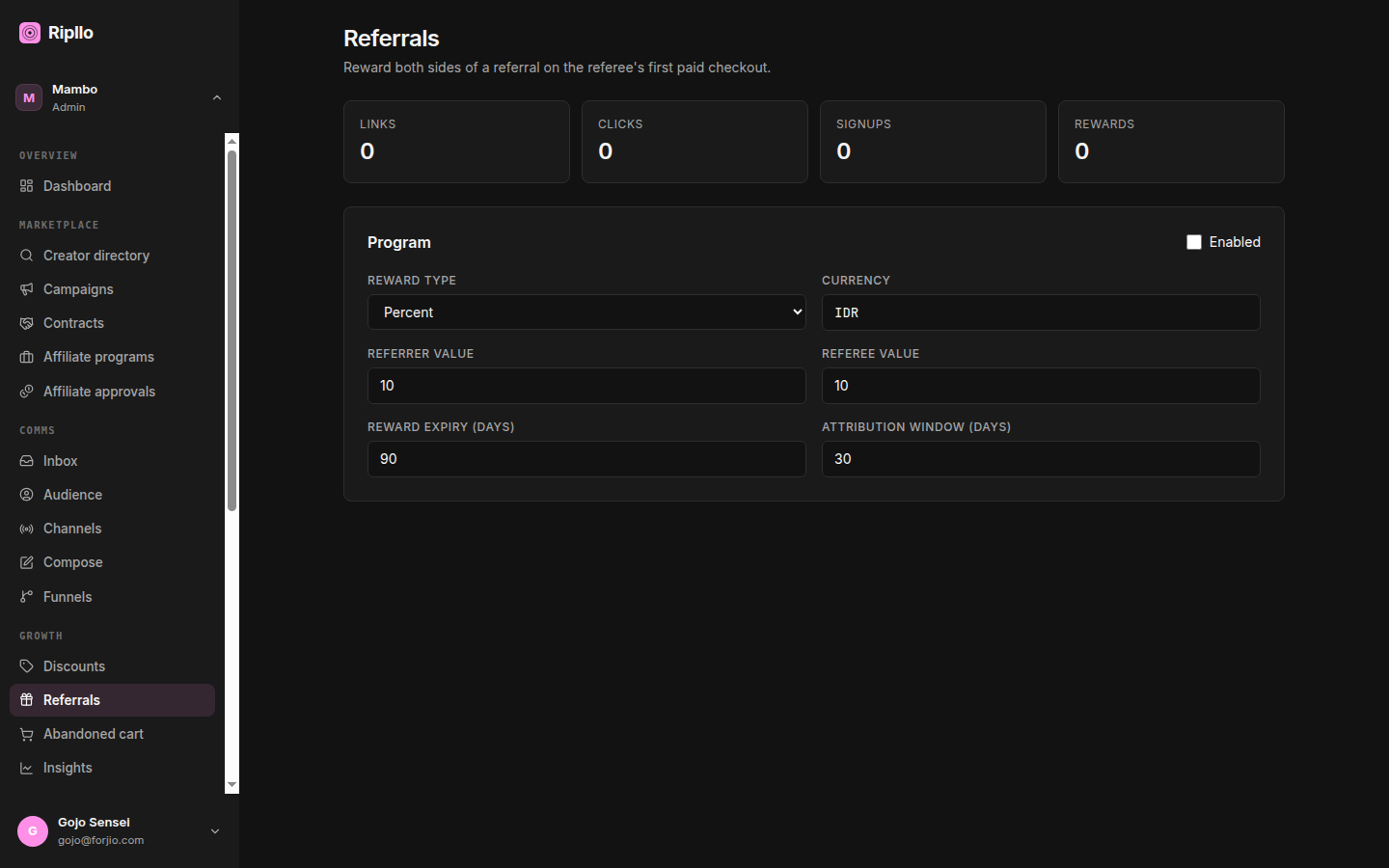
A referral program turns your existing customers into a distribution channel. They get a shareable link; when someone new clicks it and makes a qualifying purchase, both sides get a reward.
Unlike discount codes, referral programs are per-workspace — there's exactly one configuration, and every customer who has bought from you can mint a link against it. You configure the rules once and the system handles attribution end-to-end.
Rule of thumb. Referrals reward two sides: the existing customer (the referrer) and the new one (the referee). Most programs work best when the referee's discount is generous enough to win the click, and the referrer's reward is generous enough to keep them sharing.
What a referral program holds
| Field | What it's for |
|---|---|
enabled |
Master switch. When false, the link-issue endpoint returns null and no rewards mint. |
rewardType |
percent, fixed, shipping_percent, or shipping_fixed. Same shape on both sides. |
referrerValue |
Reward for the existing customer who shared the link. |
refereeValue |
Reward for the new customer who clicked it. |
currency |
Currency for fixed rewards (and minPurchaseAmount). |
minPurchaseAmount |
Smallest order that triggers a reward on either side. |
rewardExpiryDays |
How long an issued reward stays valid after it mints. |
attributionWindowDays |
How long after a click the referrer still gets credit. |
maxRewardsPerReferrer |
Optional cap so one customer can't keep collecting forever. |
programTerms |
Long-form terms shown on the referral landing page. |
Setting up the program
Navigate to Dashboard → Referrals. The page shows your current configuration (or a "set up your program" CTA if you've never saved one).
The form is always editable and saves as you change it — there is no Edit button and no Save button. Each control fires PUT /api/v1/referrals/program on change (a "Saving…" line appears under the form while it's in flight), and because the program is a single row, every save overwrites it.
The page exposes seven of the fields above — the Enabled switch, Reward type, Currency, Referrer value, Referee value, Reward expiry (days), Attribution window (days) — plus the campaign selector. minPurchaseAmount, maxRewardsPerReferrer and programTerms have no input in the dashboard today; set them through the API or the CLI.
Tie to a campaign
The referral program carries an optional marketingCampaignId. When set, the program's attributions roll up under the parent Campaign detail page. Because the referral program is workspace-wide (one row per merchant), tying it to a campaign is a soft signal — it pins this program to a specific marketing push for reporting purposes, not a hard scoping rule. Leaving it blank is the default.
How attribution flows
The lifecycle has five touchpoints. Most of them are wired up automatically if you're using the SDK or coming through Storlaunch.
All five calls are authenticated. Sign them as a partner (
Authorization: Ripllo-HMAC-SHA256 …, plusX-Ripllo-On-Behalf-Of: acc_<merchantAccountId>when you're a platform key acting for a merchant) — the SDK does this for you. The workspace comes from the signed principal, not from the request: anaccountIdin the body is only allowed if it matches, and a mismatch is rejected with403 ACCOUNT_MISMATCH. The bodies below therefore omit it. Unauthenticated calls to any of them get401.
1. Issue a link (existing customer requests one)
POST /api/v1/referrals/links/issue
{ "customerId": "..." }
Returns a link with a unique code (e.g. alice-7Q9). One link per customer. Calling the endpoint twice returns the same link.
2. Record a click
When the referee clicks the link, your storefront calls:
POST /api/v1/referrals/links/click
{ "code": "alice-7Q9" }
This bumps the link's click counter and returns the underlying program/link IDs so you can set an attribution cookie.
3. Attribute on signup
When the referee creates an account (or completes guest checkout):
POST /api/v1/referrals/attributions/signup
{
  "refereeCustomerId": "cust_...",
  "refereeEmail": "...",
  "referrerEmail": "...",
  "linkCode": "alice-7Q9",
  "externalSource": "storlaunch",
  "externalRef": "<storlaunchCustomerId>"
}
This creates a pending attribution row. referrerEmail is optional but worth sending — it powers the second self-referral guard below.
4. Fulfill on payment
When the referee's first qualifying order clears:
POST /api/v1/referrals/attributions/fulfill
{
  "checkoutSessionId": "...",
  "status": "paid",
  "currency": "IDR",
  "amount": 250000
}
Ripllo checks minPurchaseAmount, mints two discount codes (disc_*) — one for the referrer, one for the referee — and flips the attribution to rewarded. The codes appear in each customer's "my rewards" view.
5. Void on refund
If the order is later refunded:
POST /api/v1/referrals/attributions/void
{ "checkoutSessionId": "..." }
Ripllo flips the attribution to voided and revokes the issued reward codes. The customers see them disappear.
The stats strip
/dashboard/referrals has no separate Stats tab — four tiles sit inline at the top of the page, above the program form:
- Links — how many customers have minted a link.
- Clicks — lifetime clicks across every link.
- Signups — lifetime attributed signups.
- Rewards — lifetime rewards minted.
All four are lifetime totals aggregated off the ReferralLink counters; there is no 30-day window and no per-status breakdown.
This is GET /api/v1/referrals/stats (SDK: ripllo.referrals.stats()), which returns six fields — the four above as totalLinks / totalClicks / totalSignups / totalRewards, plus attributedRevenue (the sum of ReferralLink.revenue) and conversionRate (totalRewards / totalClicks, or 0 when there are no clicks).
Attributions themselves carry one of four statuses: pending, rewarded, voided, expired. Read them from the attribution rows — the stats endpoint doesn't break down by status.
"My rewards" (customer-facing)
The endpoint GET /api/v1/referrals/rewards/:accountId/:customerId returns every reward code issued to a given customer (both as referrer and as referee), along with status and expiry. Use this to power a "Your rewards" tab in your storefront's account area.
Expiring pending attributions
POST /api/v1/referrals/sweeps/expire-pending flips stale pending rows to expired. The cutoff is program.attributionWindowDays after the click.
Expiry only happens when that endpoint is called — Ripllo ships no scheduler process of its own, so nothing expires on its own timer unless an external cron is pointed at the route. The sweep is cross-tenant (it walks every workspace), so it requires a key with the ripllo:platform:admin scope; a merchant key gets 403 FORBIDDEN. If you need a guaranteed cutoff in your own storefront, treat attribution.expiresAt as the source of truth rather than the status column.
What you can't do (yet)
- Tiered rewards — one flat value per side. Tiered ladders (10% on first, 15% on third) are backlog.
- Reward in store credit — rewards always mint as discount codes, not as wallet balance.
Self-referral guards
Attribution refuses to credit a customer for referring themselves. Two checks run at signup time, before the pending row is written:
- Same customer — the referee's
refereeCustomerIdmatches thecustomerIdthat owns the link. - Same email —
referrerEmailandrefereeEmailmatch, compared case-insensitively after trimming. This one only runs when you send both.
Either match drops the attribution silently (the endpoint returns null), so nothing is created and no reward mints. minPurchaseAmount is an additional guard, not the only one.
Next
- Discounts — the discount-code surface (where rewards land).
- Marketing — pixels and abandoned-cart.
- API reference — every endpoint.