Portal tour
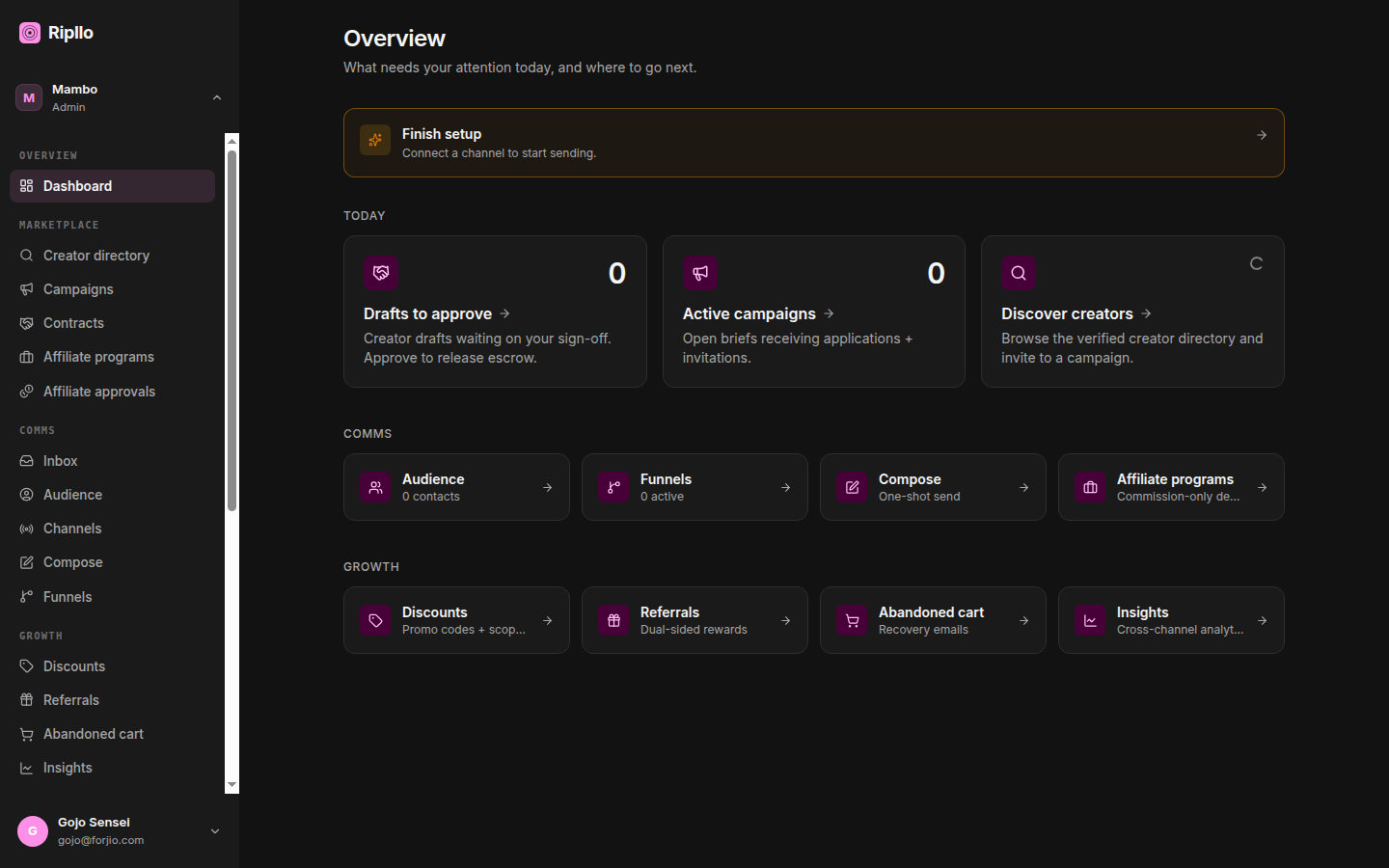
The Ripllo dashboard at ripllo.com/dashboard is where you manage everything: discount codes, referral programs, abandoned-cart recovery, pixels, blog posts, marketing campaigns, API keys. This page is a fast tour so you know where to find each surface; deeper per-feature docs live one level down.
The layout
The dashboard uses a left-sidebar layout with six sections, recolored from the same Forjio family shell Plugipay and Fulkruma use. Every dashboard page caps width at max-w-5xl so the content stays readable on wide monitors.
There is no top bar on desktop — everything chrome-related lives in the sidebar itself:
- Workspace switcher (sidebar header) — pick which workspace you're operating in. Your choice is remembered in a cookie.
- Portal switcher — jump between the Merchant, Creator and Affiliator portals.
- Account menu (sidebar footer) — support, documentation, legal, sign out.
On narrow screens the sidebar collapses behind a burger in a mobile header, which carries the workspace switcher too.
There is no global search. Search boxes are per-table — each list page filters its own rows; nothing searches across discount codes, blog posts and contacts at once.
The six sections
Overview
- Dashboard — the landing page: plan/usage card and recent activity.
- Insights — cross-feature analytics: discount uplift, referral-driven revenue, recovery rate.
Campaigns
- All campaigns — the marketing-campaign hub. Campaigns are their own top-level section, not a creator-marketplace sub-item: a campaign is the parent object that discounts, reminders, broadcasts and creator briefs roll up into.
Marketing
Everything that drives demand — creator and affiliate work sits here alongside the conversion primitives.
- Creators — browse and invite creators to paid collaborations.
- Creator briefs — the briefs creators apply to.
- Contracts — in-flight collaborations, deliverable approvals, escrow status.
- Affiliators — self-serve commission programs.
- Affiliate approvals — review pending affiliate applications.
- Discounts — create, edit, and revoke discount codes. Includes the redemption ledger.
- Referrals — configure your single per-workspace referral program; view attribution stats; inspect issued links.
- Abandoned cart — see what's been recovered, configure the reminder delay and copy.
- Blog — storefront content hub with RSS + sitemap.
Every merchant sees these entries. The sidebar is a static list — there's no enrolment gate and no per-section permission filter, so the creator and affiliate surfaces are visible whether or not you've started using them.
Channels & Audience
- Inbox — replies and conversations from connected channels.
- Audience — contacts, contact lists and segments. Where you build the "who" for a send.
- Channels — connect the email/WhatsApp/SMS providers a send goes out through.
- Compose — one-shot broadcasts across connected channels.
- Funnels — multi-step automations that branch on engagement events.
- Pixels — Meta CAPI, GA4, Google Ads, TikTok pixel IDs.
- Product feeds — Google Merchant Center XML feed configuration.
Developer
- API keys — mint, revoke, audit usage.
- Webhooks — register endpoints for Ripllo events.
- Audit log — API-key and webhook-endpoint changes, with actor + timestamp.
Settings
- Brand profile — the brand identity creators and templates draw from.
- Workspaces — manage multiple workspaces under one Huudis account.
- Billing — Plugipay-managed subscription and invoices.
- Account — your own profile and preferences.
Per-feature pages
We've kicked off four deeper portal pages to cover the core marketing surfaces:
- Campaigns — the campaign hub everything else rolls up into.
- Discount codes — the canonical promo-code workflow.
- Referrals — configuring the program and reading attribution stats.
- Marketing — pixels, abandoned cart, marketing campaigns.
The remaining surfaces (insights, audience, compose, funnels, blog, settings) are covered briefly here and will get their own pages as the docs grow.
Through-Storlaunch view
If you got to Ripllo via Storlaunch's portal, you won't see this layout directly — you'll see Storlaunch's chrome with Ripllo's marketing pages embedded. The underlying data is identical, and the URLs map cleanly:
| Storlaunch URL | Ripllo equivalent |
|---|---|
storlaunch.com/dashboard/discounts |
ripllo.com/dashboard/discounts |
storlaunch.com/dashboard/referrals |
ripllo.com/dashboard/referrals |
storlaunch.com/dashboard/abandoned-cart |
ripllo.com/dashboard/abandoned-cart |
The Storlaunch routes proxy to Ripllo — there's no separate data path.
Next
- Discount codes — the most-used surface.
- Referrals — dual-sided rewards.
- Marketing — pixels + campaigns.